Paste a TikTok or Instagram link.
Your page posts it while you sleep.
Send TikTok or Instagram Reel links to a private Telegram bot from your phone. Moonpost downloads them in HD and posts them as Reels inside the hours you choose — on your own computer, so your Instagram login never leaves your machine.
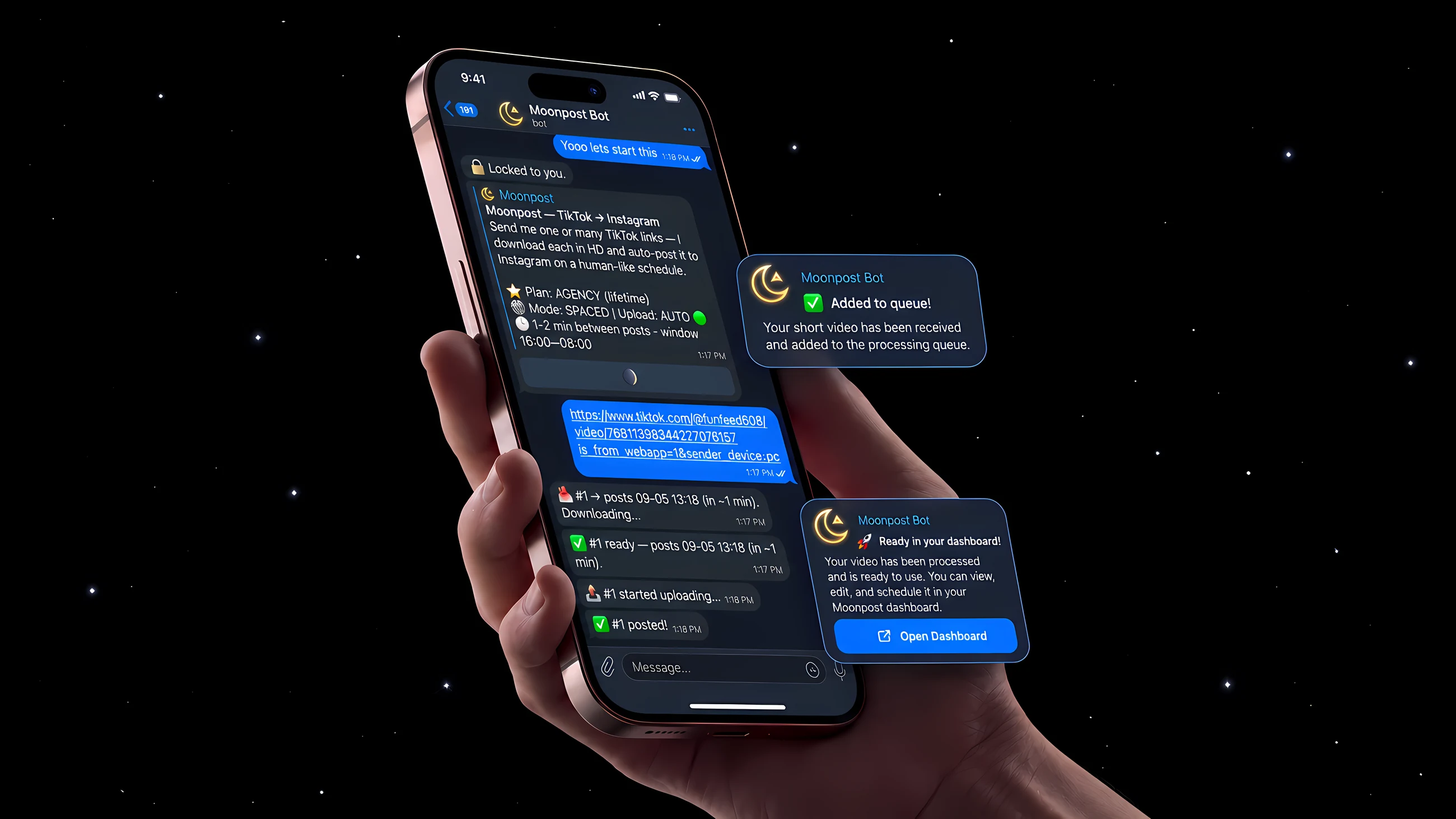

Results from the pages we run.
Not one lucky account — unedited dashboards and profile screens from several pages, all posting on Moonpost. The biggest of them is @slopfeed.exe, linked in the footer.
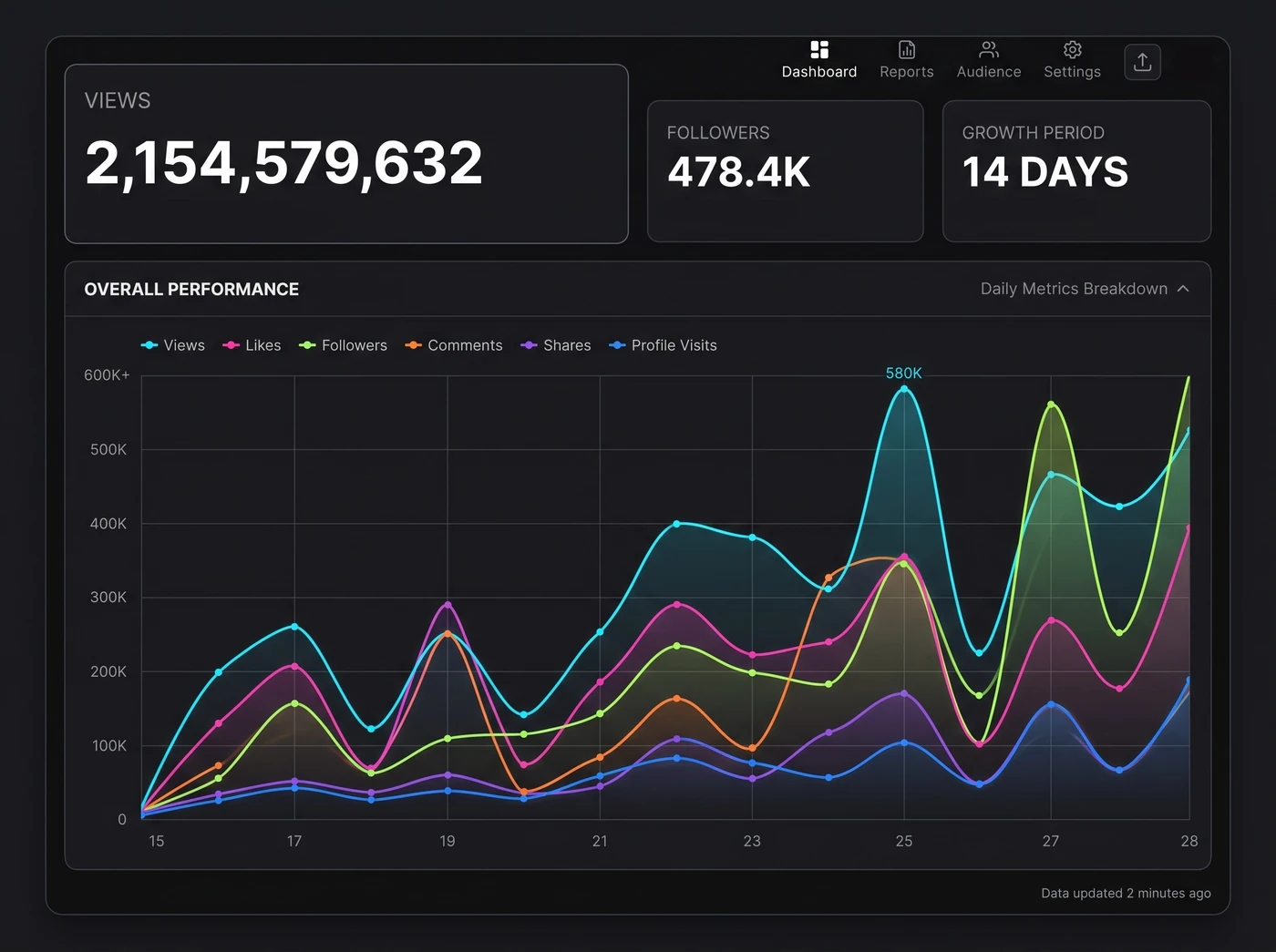
2B+ Views in 14 Days
2,154,579,632 views and 478.4K new followers, every Reel of it posted automatically.
Views2B+
Start posting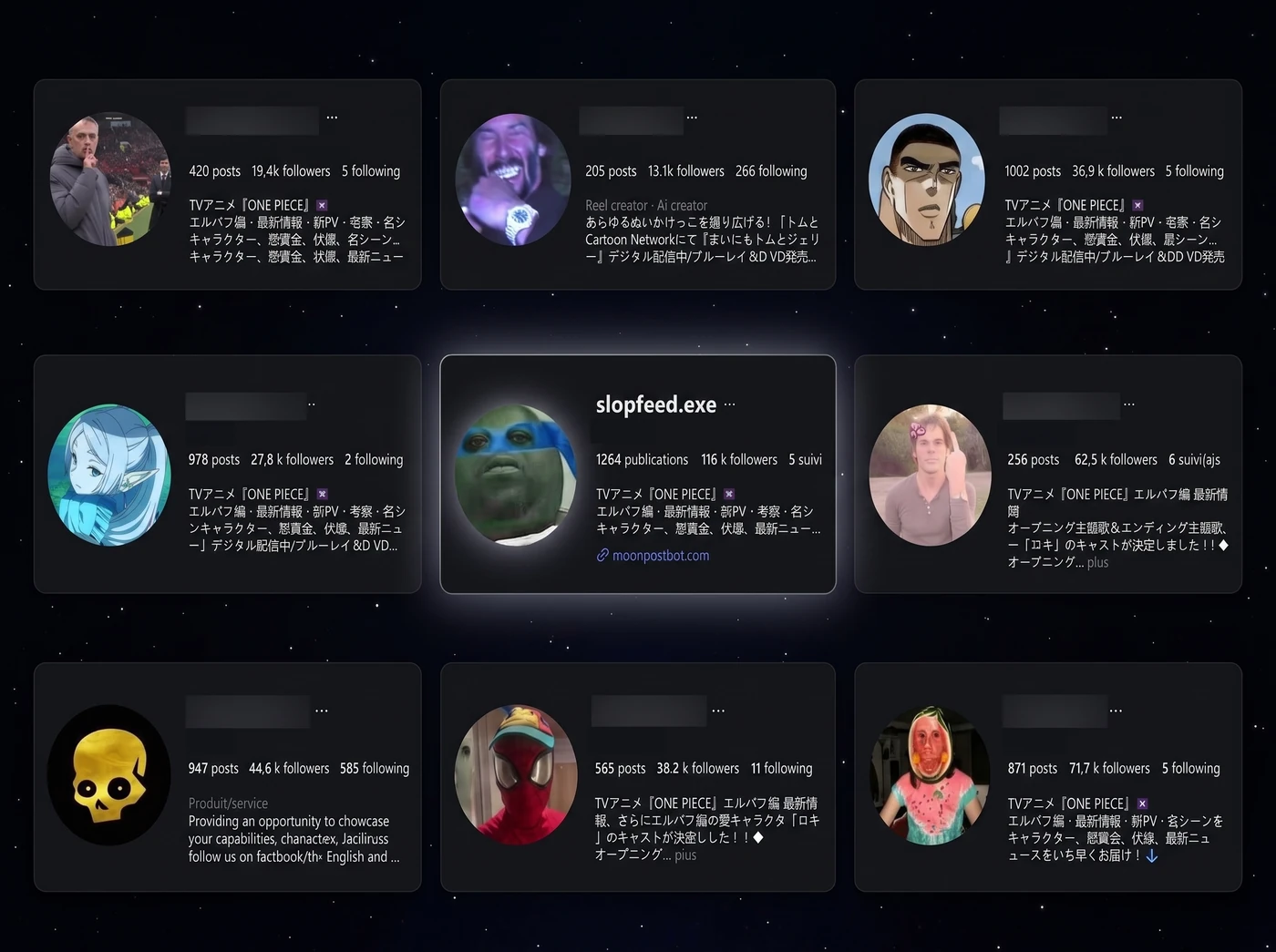
400K+ Followers, Nine Pages
Nine faceless pages, all fed by the same bot. @slopfeed.exe leads at 116K followers.
Followers400K+
Start posting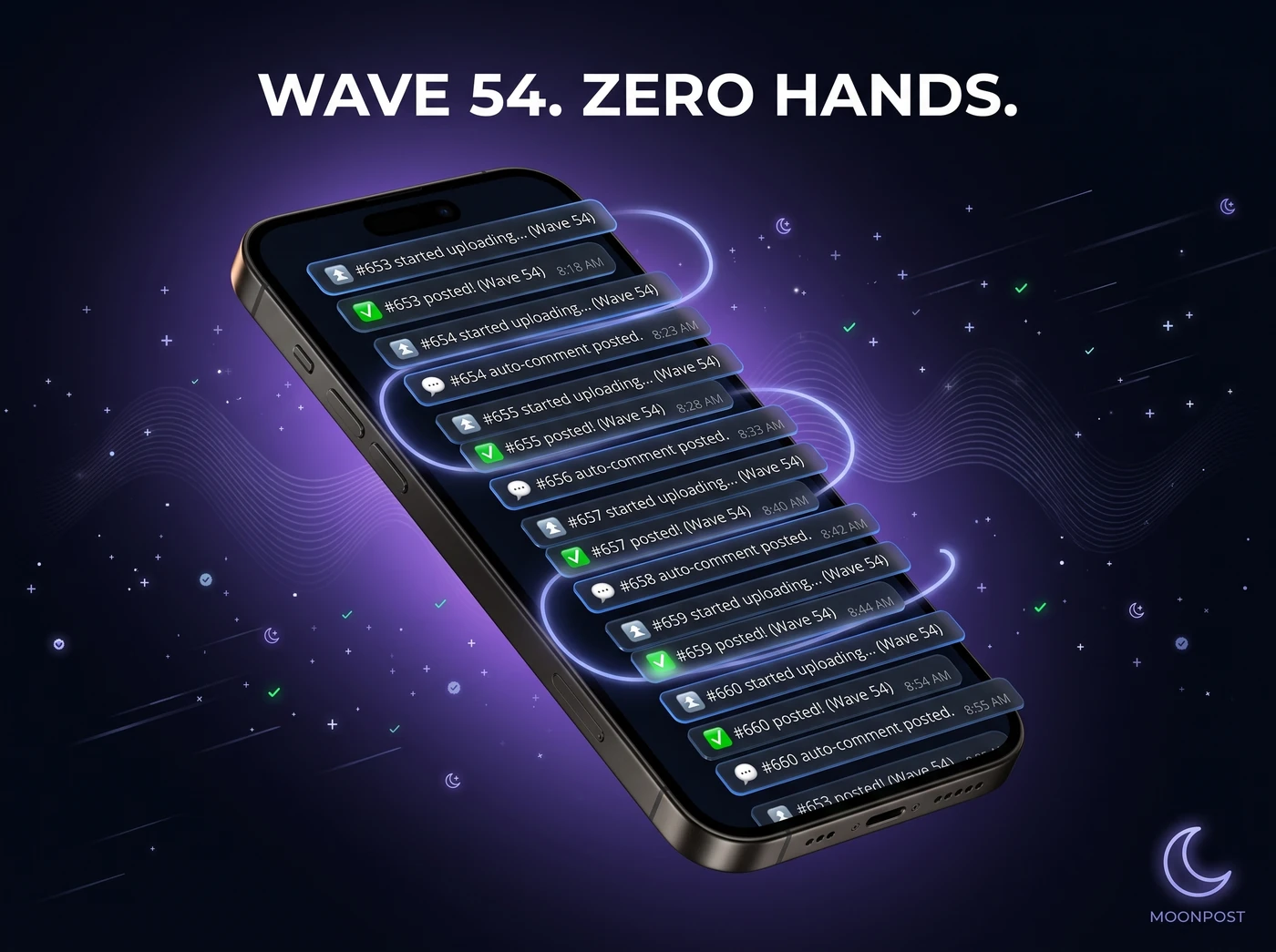
Wave 54, Zero Hands
A live Telegram log: upload, posted, auto-comment, repeat. Nobody at the keyboard.
StatusActive
Start posting
Get the same setup
01 of 03
These are our own results across the pages we run, plus results from real accounts shared with permission. Your results depend on your content, niche, and consistency. Nothing here promises a specific outcome.
From a TikTok or Instagram link to a scheduled Reel, in three steps.
Send links once, set your window, and Moonpost works the queue. Nothing to watch, no browser tab to keep open.
Send the links
Paste one link or a hundred into your private Telegram bot, straight from your phone — TikTok or Instagram Reels. Videos join the queue; photo posts are turned away automatically.
Moonpost builds the queue
It downloads each video at the highest resolution available, with no watermark, and retries quietly when the source stalls.
It posts on your schedule
You set the hours, the gaps between posts, and the batch size. Moonpost follows that pattern for as long as your computer is on.
Why faceless pages work.
Queue videos you own or are licensed to share, and let the schedule handle the repetitive part.
Faceless
You never appear. No camera, no voice, no editing suite. The page is the brand, not you.
Content you control
Use your own videos, or content you are licensed to share. Moonpost handles the repeatable work of preparing and scheduling it.
Small setup cost
A computer that can stay on, an Instagram account, and Moonpost. That is the whole list.
Volume is the strategy
Faceless pages win on consistency, not on one perfect video. A schedule that never forgets is what makes that volume possible.
Less daily admin
Send links from your phone the moment you find something. The queue keeps moving inside your window while you do something else.
Where the money comes from
Large pages earn through brand deals, promos and shoutouts, or they get sold. That part is your work — the software only handles the posting.
Post on your schedule, not a server's.
Pick the hours and the cadence. Moonpost runs on your computer's local clock, so the queue is active exactly when you say.
Spaced
One video at a time, with a random gap you choose between posts. The simplest way to hold a steady rate.
/gap 7 14 → 7–14 minutes apart
Waves
Fill a batch, post it a set gap apart, then rest before the next one. You set the batch size, the break, and the daily cycle — big volume that still reads as human.
/wave 15 · /break 2h · /perday 5
Control every setting from Telegram.
Change the schedule, the queue, and every posting rule from your phone. No restarts, no config files, no code.
Flexible timing
Set a random gap range between posts and longer breaks between Waves.
/gap 3 5
Posting windows
Only posts inside the hours you choose, on your own machine's clock.
/window 16 8
Waves batch mode
Batch a group, post it at your chosen interval, then rest before the next batch. Set the batch size, break, and daily cycle.
/waveson · /wave 15 · /break 2h · /perday 5
Pro
Spaced mode
One video every few minutes, non-stop. The simplest way to hold a steady rate.
/wavesoff
HD, no watermark
Downloads the highest available version of each video, then caches it before posting.
Auto first comment
Drops your own first comment on every post, a natural delay after publishing — useful for a call to action.
/commenton
Pro
Schedule one post
Send a link with "at 21:30", "in 2h" or "now". Retime, redo or cancel any post by its number.
/settime 5 at 22:00 · /upload 42
Caption and cover
A default caption and a custom cover frame on every Reel, so uploads land on-brand without touching each one.
ProThe queue, and a health check
See everything scheduled in order, and get a one-line answer when something is wrong.
/queue · /status · /test
Retries and resume
A failed download or a hiccup on Instagram retries quietly in the background. Restart the machine and the queue picks up where it stopped.
Owner lock
The first Telegram chat to message the bot becomes its permanent owner. Everyone else is turned away.
Your account stays on your machine.
Moonpost is self-hosted software that runs entirely on your own computer. No middle-man server is holding your Instagram login, because there is no server.
Owner-locked by design
The first Telegram chat becomes the permanent owner. Everyone else gets a flat "this bot is private."
Local session storage
Your Instagram session lives in a file on your computer. It is never uploaded, never shared, never sent to us.
One bot, one account, one token
Your install drives a single Instagram account through a single Telegram bot with its own token. Nothing is pooled, nothing is shared.
Graceful session handling
If Instagram asks you to re-verify, the bot pauses and tells you what to do. It never hammers a locked account.
What buyers said.
Somewhere you can check it yourself, instead of on our own page.
Instagram highlights
Open the highlights
The real reviews are in the @slopfeed.exe highlights.
We took the quoted testimonials off this page. Actual buyer messages — screenshots, questions, and the awkward ones — are saved in the story highlights on @slopfeed.exe. Open the profile, tap the highlights, and read them in the buyers’ own words rather than ours.
Pick the plan that fits how much you post.
Starter keeps a steady schedule running by itself. Pro adds Waves, unlimited posts, auto first comments and custom covers. Agency adds done-with-you setup and priority support.
Monthly
Annual
2 months free
Starter
A steady schedule, running by itself
$19
/ mo
Launch rate · returns to $39
- Send TikTok or Instagram links, they auto-post as Reels
- HD downloads, no watermark
- Your caption on every post
- Flexible Spaced schedule
- Run it all from Telegram, on your phone
- Up to 50 posts a day
- Email support
- Waves batch mode
- Auto first comment and custom cover
- Setup done with you
Full refund if we can't get it posting
Pro
The full toolkit, with no daily cap
$39
/ mo
Launch rate · returns to $79
- Everything in Starter, plus
- Waves mode for maximum volume
- Auto first comment on every post
- Custom cover frame on every Reel
- Unlimited posts, no daily cap
- Standard support
- Setup done with you
- Priority one-to-one and early features
Full refund if we can't get it posting
Agency
Set up with you, with priority support
$69
/ mo
Launch rate · returns to $139
- Everything in Pro, plus
- Setup done with you, start to finish
- Priority one-to-one support
- Early access to every new feature
- A posting plan built for your niche
- Direct founder access on Telegram
- Free updates as TikTok and Instagram change
- A second pair of eyes on your posting settings
Priority support · full refund if we can't get it posting
PayPal
USDT
Bitcoin
Ethereum
Solana
+ more coins
Pay with PayPal or crypto. Your download, licence key, and setup guide arrive by email once the payment lands.
What you need: a Windows PC or Mac that stays on while it posts, an Instagram account, and Telegram. Follow the illustrated guide, or choose Agency and set it up with us.
Questions, answered straight.
Including the ones with an uncomfortable answer.
Will this get my Instagram account banned?
No tool can promise immunity, and we will not pretend otherwise. What Moonpost does is lower the risk: randomised gaps, batched waves with long rests, posting windows, natural rate limiting, and an automatic pause the moment Instagram asks you to re-verify — it never hammers a locked account. You control the volume. Start conservative, then scale.
What exactly do I get when I buy?
The Moonpost app as a single file — no Python, no coding — your personal licence key, the full step-by-step setup guide written for non-technical people, and support. It is emailed to you. Guided setup is an Agency feature: on Starter and Pro you follow the illustrated guide and email us if you get stuck.
What do I need to run it?
A computer that stays on while posting — a cheap always-on mini-PC works well. There is a Windows version and a Mac version, so either works. You also need an Instagram account and the free Telegram app. Moonpost is a single app you double-click: no Python, no coding, nothing to install. Total setup is about 15 minutes with the illustrated guide.
Do I need to keep my computer on?
Yes, during the hours you want it posting. Moonpost is self-hosted and runs on your own Windows PC or Mac, so the machine needs to be powered on for scheduled posts to go out — the screen can be off and the lid can be closed. It does not need to be on 24/7 unless your posting window is. We include a one-click hidden launcher and instructions for disabling sleep, and the queue survives a restart.
What are the plan limits, really?
Starter, $19 a month — the essentials. TikToks and Instagram Reels auto-post to your Instagram with your caption, on a safe, human-like schedule, up to 50 posts a day. Pro, $39 a month — the full toolkit: Waves batch mode, auto first comment, custom covers, and unlimited posts with no daily cap. This is the plan most people pick. Agency, $69 a month — everything in Pro plus setup done with you, priority one-to-one support, early access to new features, and a posting plan for your niche.
What is "setup done with you"?
It is the Agency perk. Instead of following the guide alone, we walk you through every step over chat — install, config, your account, your posting routine — replying fast until it is posting. You also get priority one-to-one support afterwards, so you are never stuck.
Do the posting times use my timezone?
Yes. The engine runs on your machine's local clock, so set the window to whatever reaches your audience. Change the hours any time with /window — for example /window 16 8 posts from 4 PM through 8 AM.
What is the difference between Spaced and Waves?
Spaced drips one video out every few minutes, non-stop — simplest for steady volume. Waves batches a group, posts them a gap apart, then takes a long rest before the next batch, with a day-cycle counter that keeps big volume looking human. Waves is on Pro and Agency.
Is reposting other people's videos allowed?
You are responsible for having the rights to anything you post. Moonpost is intended for reposting your own content, or content you are licensed or authorised to share, in line with TikTok's and Instagram's terms of service. Please respect original creators and copyright — see our DMCA and copyright policy.
How do I pay?
Two ways: PayPal or crypto — USDT, BTC, ETH and more, with USDT on BSC or TRC-20 being the cheapest. Pick your plan, choose the method at checkout, and your download and licence key are sent to your email once the payment lands. Card checkout is coming later.
What is your refund policy?
We do not do change-of-mind refunds. The guarantee that matters is this: if we cannot get Moonpost working for you, you get a full refund. We troubleshoot it with you first and do not stop while there is something left to try, so you are never left holding software that will not run. Full details in the refund policy.

Stop uploading one Reel at a time.
Set it up in about 15 minutes, send links from your phone, and let the schedule do the rest. If we can't get it posting, you get a full refund.